Product Build · 4 min read
How I Built a Chipotle Macro Calculator: Live Calories, Macros & Shareable Orders
Inside Macroline: live calorie and macro totals, light and double portions, goal-based presets and shareable order links, with honest data limits.
 By Ali Iftikhar ·
If you track calories or macros, ordering at a fast-casual restaurant can feel like guesswork. A bowl can land anywhere from a comfortable 500 calories to well over 1,000, depending on a handful of choices.
I built Macroline, a free calculator that shows the calories, protein, carbs, fat, fiber and sodium of a Chipotle order as you build it. Here is how it works, and a few of the design decisions that make it quick to use.
What it does
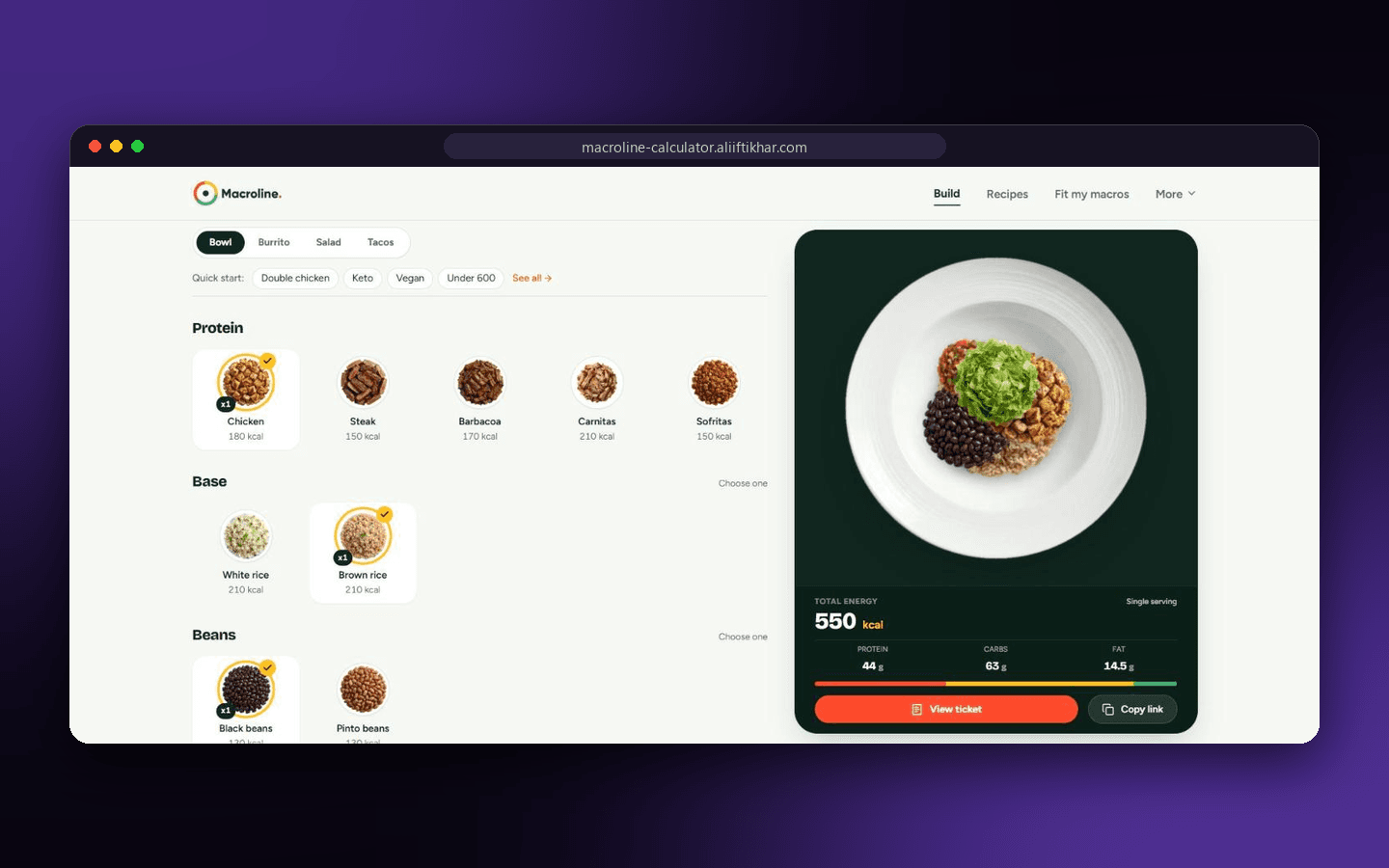
You pick a meal type: bowl, burrito, salad or tacos. Then you tap the ingredients you want, and the totals update instantly. For a chicken bowl with brown rice, black beans, fresh tomato salsa and romaine, the page shows about 550 calories with 44 g of protein, 63 g of carbs and 14.5 g of fat.
A few details make it practical:
- The right tortilla or shells are added automatically when you choose a burrito or tacos.
- Any ingredient can be light, regular or double.
- Quick-start presets get you to a sensible order fast: double chicken, keto, vegan, under 600 calories.
- A "Fit my macros" finder suggests orders for a calorie ceiling and minimum protein, carbs and fat.
- A printable ticket and a shareable link for every order.
The math: simple on purpose
Each ingredient has a stored serving with its calories, protein, carbs, fat, fiber and sodium. For example, one regular serving of chicken is listed as 180 calories, 32 g of protein, 0 g of carbs and 7 g of fat.
Portion choices are multipliers:
| Portion | Multiplier |
|---|---|
| Light | 0.5x |
| Regular | 1x |
| Double | 2x |
The order total is then a sum:
total = sum(ingredient values x portion multiplier)So double chicken contributes 360 calories and 64 g of protein before anything else is added. This is a simplified illustration of the approach, but the principle holds: keep the calculation easy to explain, and the numbers become easy to trust.
State lives in the link
One design choice I like: the whole order is stored in the page address. A bowl with chicken, brown rice, black beans, fresh tomato salsa and romaine looks like this:
?order=bowl~black_beans.1~brown_rice.1~chicken.1~fresh_tomato.1~romaine.1The meal type comes first, then each ingredient with its portion. That gives you several things for free:
- Sharing needs no account. Copy the link and the other person sees the same order.
- Refreshing does not lose your work.
- Back and forward buttons behave naturally.
- Orders are easy to bookmark.
Goal-based finding
Building an order by hand is fine when you know what you want. When you start from a target, such as "high protein under 800 calories", it is easier to search. That is what the "Fit my macros" page does.
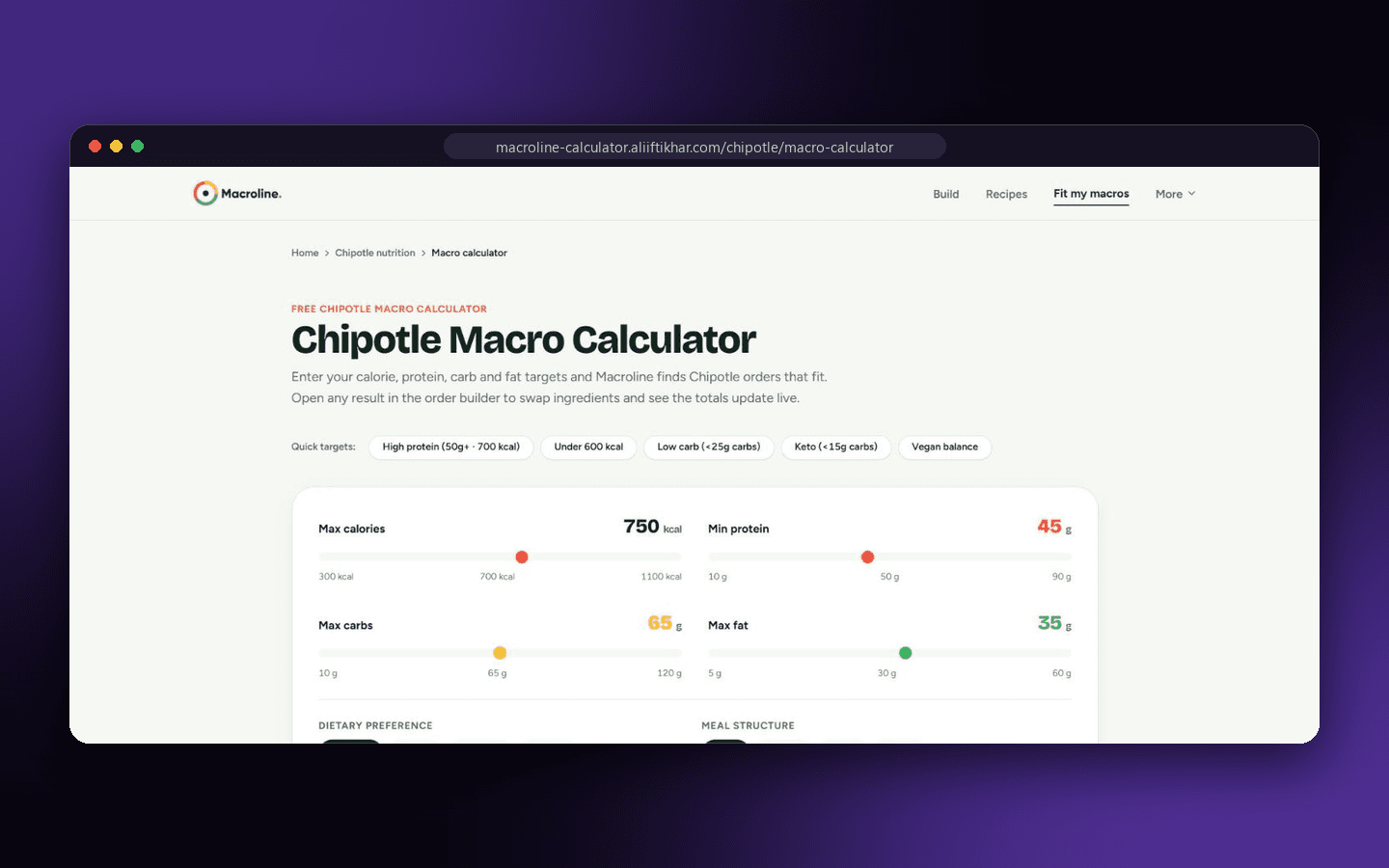
You set four sliders: maximum calories, minimum protein, maximum carbs and maximum fat. Quick targets fill them in for common goals: high protein, under 600 kcal, low carb, keto and vegan balance. You can also narrow the results by diet (any diet, vegan, no dairy, no rice) and by meal structure (bowl, burrito, salad or tacos).
Below the sliders, the finder lists recommended combinations, ranked by protein density and target precision:
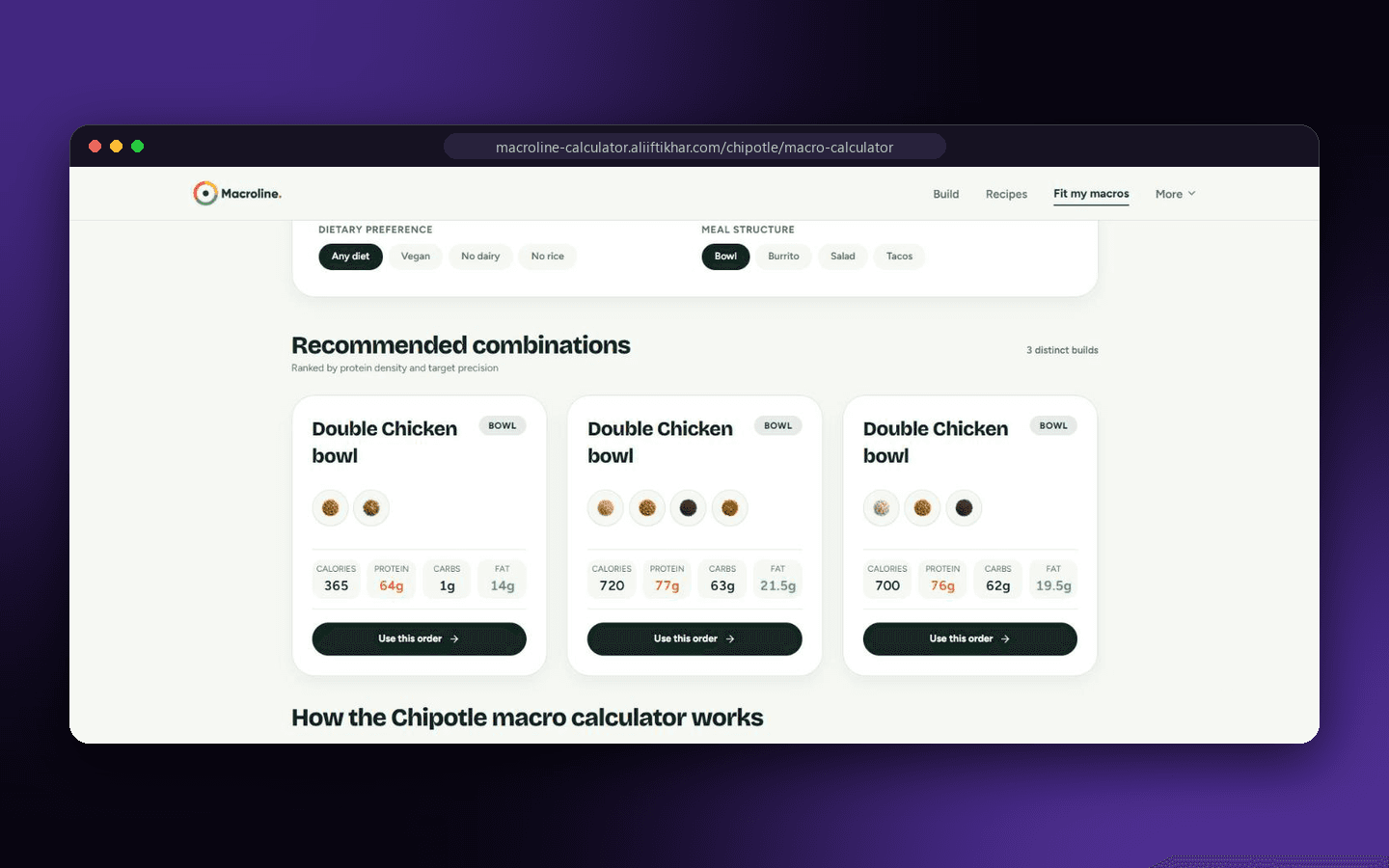
Each card shows the build, its ingredients, and its calories, protein, carbs and fat. For example, one double-chicken bowl lands at 720 calories with 77 g of protein, 63 g of carbs and 21.5 g of fat. "Use this order" opens the combination in the builder, where you can swap ingredients and watch the totals update. There are also ready-made pages for common goals like high protein, low carb, keto, under 500 calories, under 600 calories and plant-based orders.
Being honest about the data
Nutrition tools are only as good as their data, and trust matters. Macroline's numbers come from Chipotle's published ingredient chart, and the page states which version it uses. Three honesty rules shaped the design:
- The data is a reference snapshot, not live-synced, and the page says so.
- Real portions vary depending on who is serving you, so totals are estimates.
- It is an independent tool, not affiliated with or endorsed by Chipotle Mexican Grill. It is meant for meal planning, not medical or nutrition advice.
Showing the limits openly makes the tool more useful, not less.
What I learned
- Instant feedback wins. A total that changes the moment you tap is far more engaging than a form you submit.
- Make the math explainable. A short example on the page does more for trust than any claim of accuracy.
- Put state in the URL when sharing and refreshing matter.
- Design for mobile first. Most people check a menu on their phone, standing in line.
Try it
You can build your order in Macroline and see the macros in seconds. If you are planning a calculator, a data-driven tool or any product where fast, trustworthy numbers are the point, get in touch.
Related reading: AI is making developers stop thinking and why simple systems win.